Let the Bot Look Up Orders Itself: Bytedesk Connects Visitor Order and Logistics Queries Through Tools

A visitor asks "what have I bought?" or "where is order_002?" — the most common question in customer service, and the one a bot should never guess at. Previously the bot could only answer general questions; visitors had to dig through their order page themselves, or wait for a human agent.
Bytedesk's visitor bot now has a set of order and logistics query tools: the model calls read-only tools during a conversation, the server queries orders and logistics within the visitor's verified identity, and only a minimal field set goes back to the model to compose the answer.
This is not shipping the order table to the LLM, and it is not letting the model write SQL. The model can only call four fixed tools; which arguments it may pass, which fields it can see, and whose orders it can reach are all decided by the server.
Why tools instead of stuffing data into the prompt
Pasting order data into the system prompt works for small data sets, but quickly runs into three problems:
- Freshness: order status changes constantly, so a snapshot in the prompt goes stale fast;
- Context cost: dozens or hundreds of orders make the context expensive and distract the model;
- Permission boundary: once data is in the prompt, the model sees all orders and there is no way to scope it per visitor.
Tool calling flips this: expose actions, not tables. The model decides whether to look something up and which order to ask for; the server decides what can be returned. That is the core principle here — identity, scope, and field allowlists all live on the server, and model-provided arguments never grant authorization.
Four read-only tools
| Tool | Model may pass | Server enforces |
|---|---|---|
order_query_my_orders | Optional status, optional order number, page number, page size | Tenant/store/visitor come from the verified scope; page size defaults to 10 with a max of 20; invalid page numbers or oversized page sizes fall back to safe defaults |
order_query_my_order_detail | Required business orderUid | Same scope plus an exact order number; empty or over-long values are rejected; no match returns a uniform "not found or not authorized" |
logistics_query_my_order_logistics | Required business orderUid | Checks order ownership first, then reads logistics records; no record returns an empty state, never an inferred trail |
order_confirm_my_identity | Mobile number or email | Matches the visitor within the current organization (+store); rate limiting, lockout and multi-match handling all happen on the server |
All four tools are read-only. Order creation, updates, deletion and refunds are out of scope; existing write tools in the registry default to requiresApproval=true, so even if one is misconfigured onto a visitor bot it goes to approval instead of executing.
Identity first, then the order
Visitor identity has two levels, and both produce the same request-scoped identity (orgUid + shopUid + visitorUid):
Level one: the visitorUid sent by the frontend is only a candidate. The visitor frontend can carry a visitorUid (URL parameter or init config), but the value does not take effect on arrival. The server must match it to a visitor record within the current organization before building the scope. A fabricated uid is treated as unidentified and falls through to level two.
Level two: mobile or email confirmation. With no valid identity, tools return AUTH_REQUIRED, and the model asks the visitor for a mobile number or email. On success, the conversation is bound to the visitor (Redis, 2-hour TTL), so later questions need no repeat input.
The fallback path must resist enumeration and credential stuffing, so it carries these constraints:
- Five failed attempts within a 10-minute window lock the conversation for 30 minutes and route to a human agent;
- Misses, other people's orders, and non-existent orders all use the same "not found / not authorized" wording, exposing neither account nor order existence;
- A mobile number matching multiple visitors is never auto-resolved; the visitor is routed to a human;
- Binding is per conversation and does not leak into another one.
Only the fields the model should see
Anything in the model context can be repeated in an answer, written to an audit record, or land in a log. So tools return allowlisted summaries, not entities:
| Tool | Returned fields |
|---|---|
| Orders | orderUid, product title, status, statusText, totalAmount, time |
| Logistics | orderUid, carrier, tracking number (last 4 digits only), status, statusText, trajectory events, estimated delivery |
Recipient name, phone, shipping address, payment method and internal uids are never returned. When a visitor asks "what is my shipping address?", the model has nothing to answer with and can only say it cannot provide that or hand off to a human. It is not being coy; the data genuinely is not there.
Preventing cross-account access
- Filters apply at the database layer:
orgUid + shopUid + visitorUid + deleted=false, plus an exactorderUidfor details. There is no path that fetches by order number first and lets the model decide ownership afterwards. - Identity is read from the server-side
ToolContext; avisitorUidwritten into tool arguments has no effect. Prompting the model to "use someone else's uid" still returns the caller's own orders. - Querying another visitor's order returns
NOT_FOUND_OR_UNAUTHORIZEDwith uniform wording, revealing nothing about existence. - Tool exposure is opt-in: a bot only receives the tools explicitly configured and published in the admin console's Tools tab. Nothing is injected globally.
Enabling it in the admin console
The order and logistics tools live in enterprise modules (enterprise/core, enterprise/ai). The Tools tab currently appears for enterprise/platform editions with frontend debug mode enabled.
1) Prepare demo data (optional)
"Reinitialize Demo Data" on the admin Orders / Logistics pages creates 9 orders across 3 visitors × 3 statuses, plus 6 logistics records for the shipped and delivered orders. You can also call POST /api/v1/order/init/demo and POST /api/v1/logistics/init/demo.
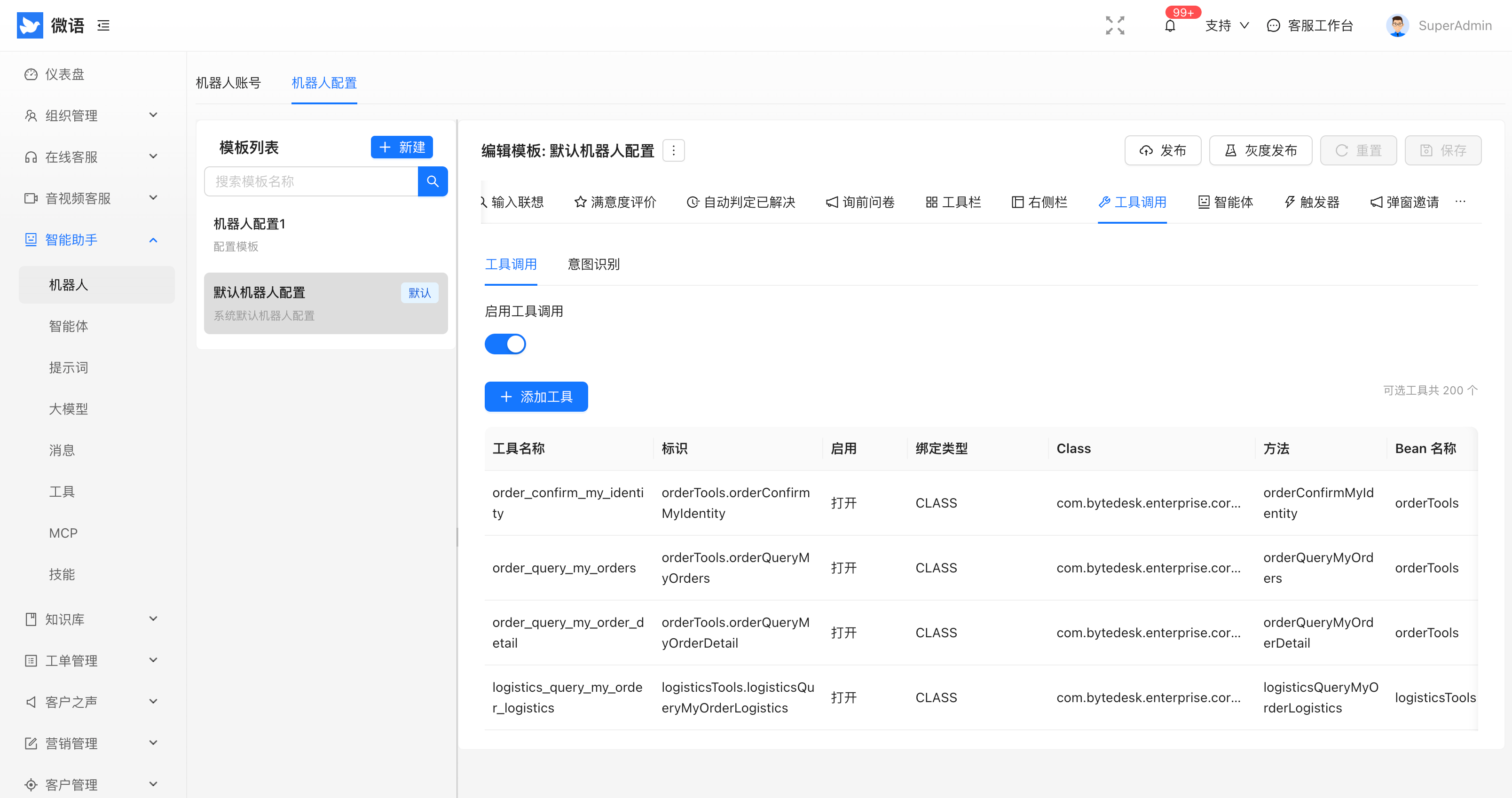
2) Configure the bot tools admin → Ai/Robot → bot settings → Tools:
- Turn on the tools switch, click "Select from ToolEntity" and add the four read-only tools;
- Set invocationMode to Auto, toolChoice to "follow model strategy", and maxToolInvocations to 6;
- Choose an LLM provider that supports function calling.
3) Add to the system prompt (recommended)
You are an order service agent. You can query the current visitor's own orders and logistics. When the visitor has not been identified, ask for a mobile number or email to confirm. Route anything you cannot provide to a human agent.
4) Publish Drafts do not take effect. This is the most common reason tools are configured but never called.
What it looks like in a conversation
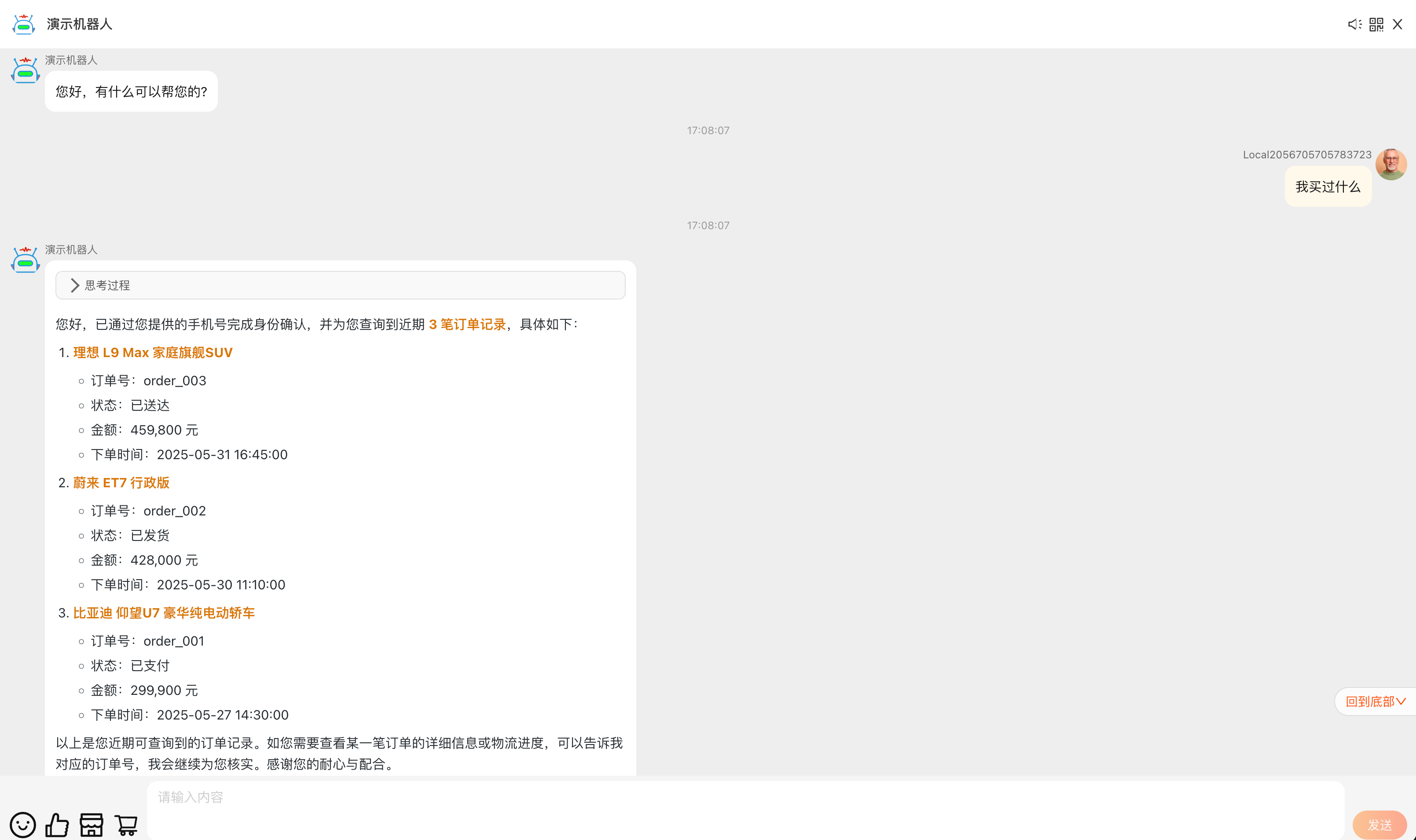
The visitor asks "what have I bought?", the bot calls order_query_my_orders and lists the visitor's orders by time:
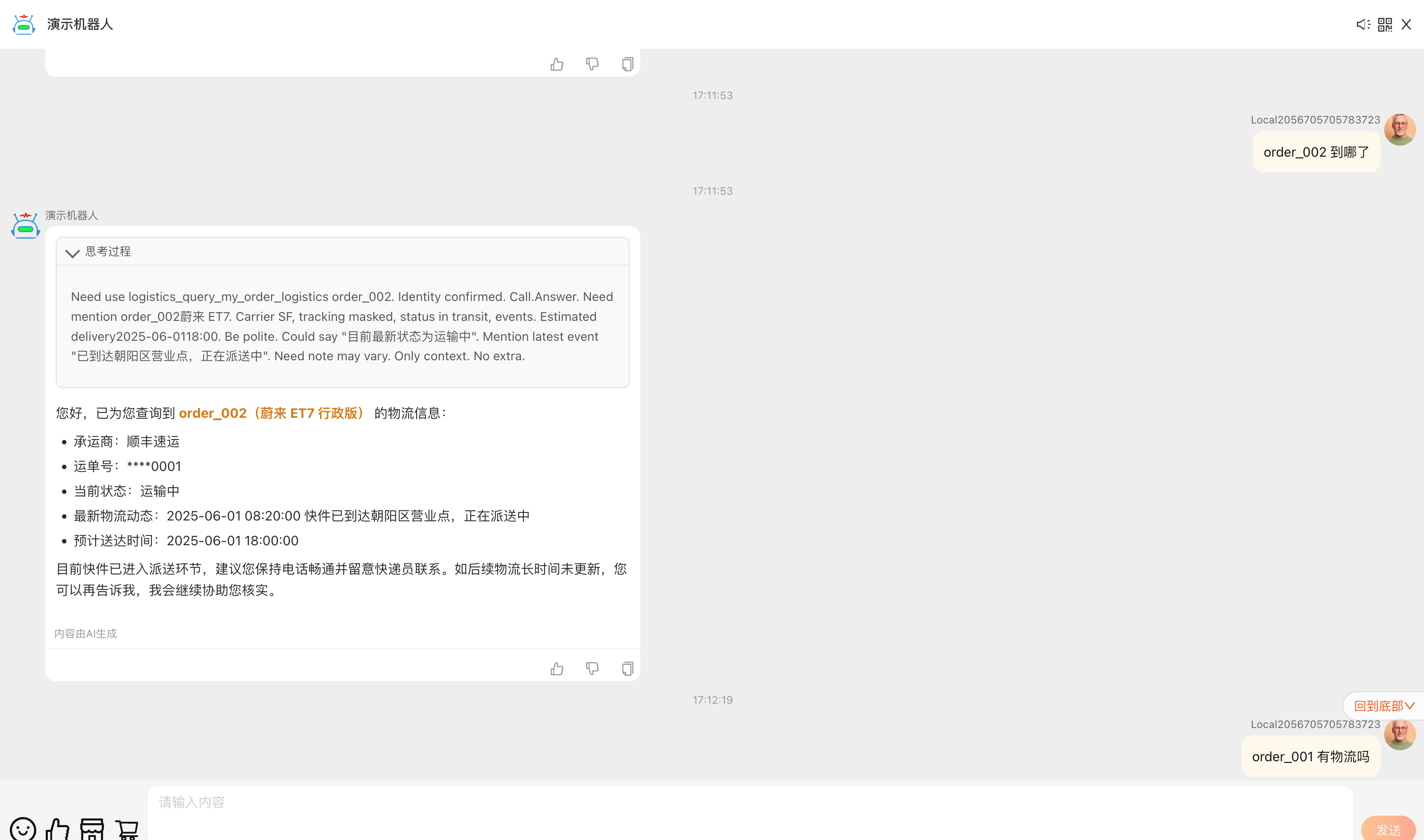
The visitor asks "where is order_002?", the bot verifies ownership, calls the logistics tool, and answers with carrier, status, trajectory and estimated delivery:
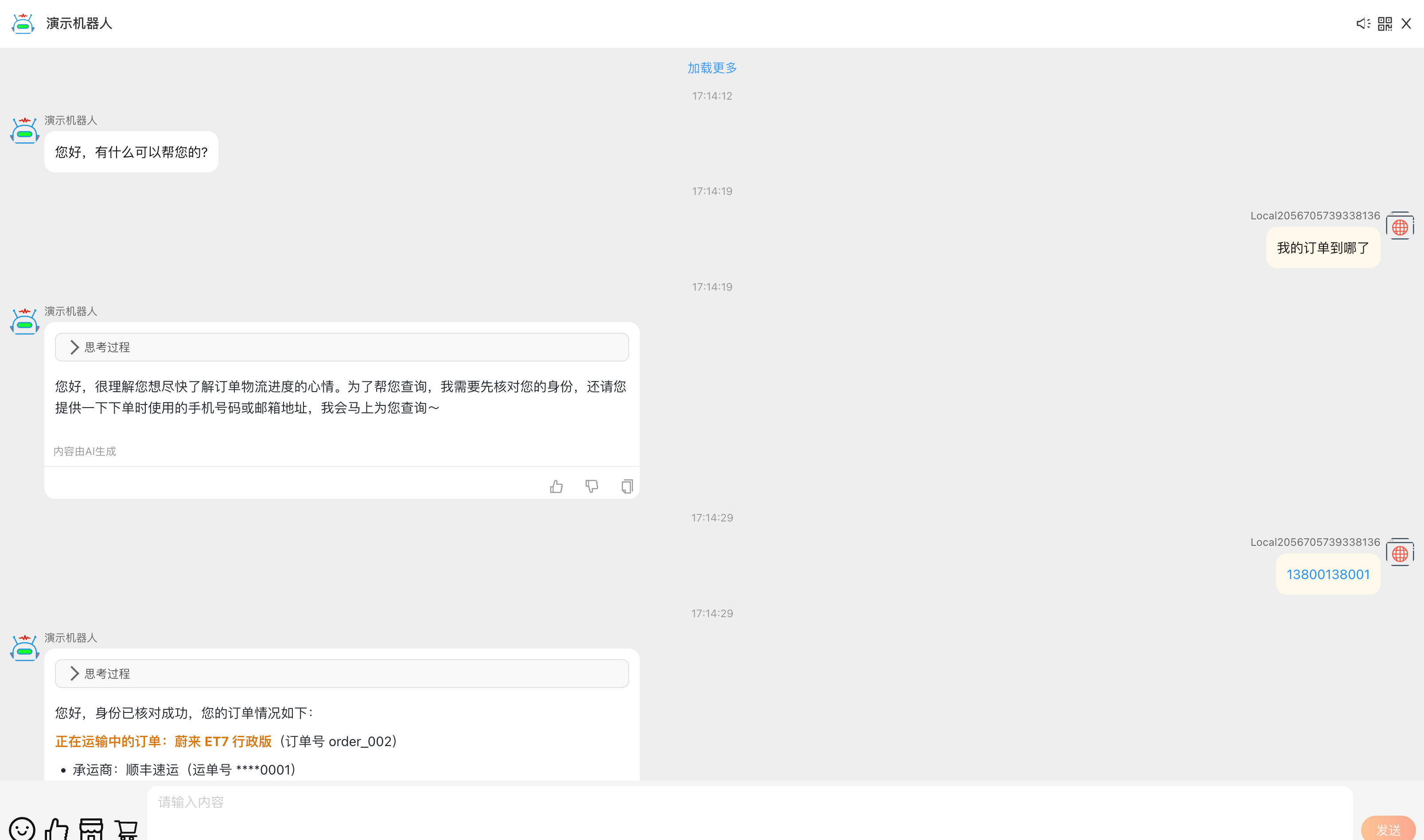
When an anonymous visitor asks "where is my order?", the bot first asks for a mobile number and, once confirmed, queries directly within the same conversation:
Audit: every call leaves a trace
Every tool call is written to the tool call log: tool name, status, conversation, duration, plus request/response payloads and toolContext. When debugging "why didn't the bot query the order?", start here. The presence or absence of a record usually separates three cases: the tool was never published, the tool name was not resolved, or the provider used native dispatch.
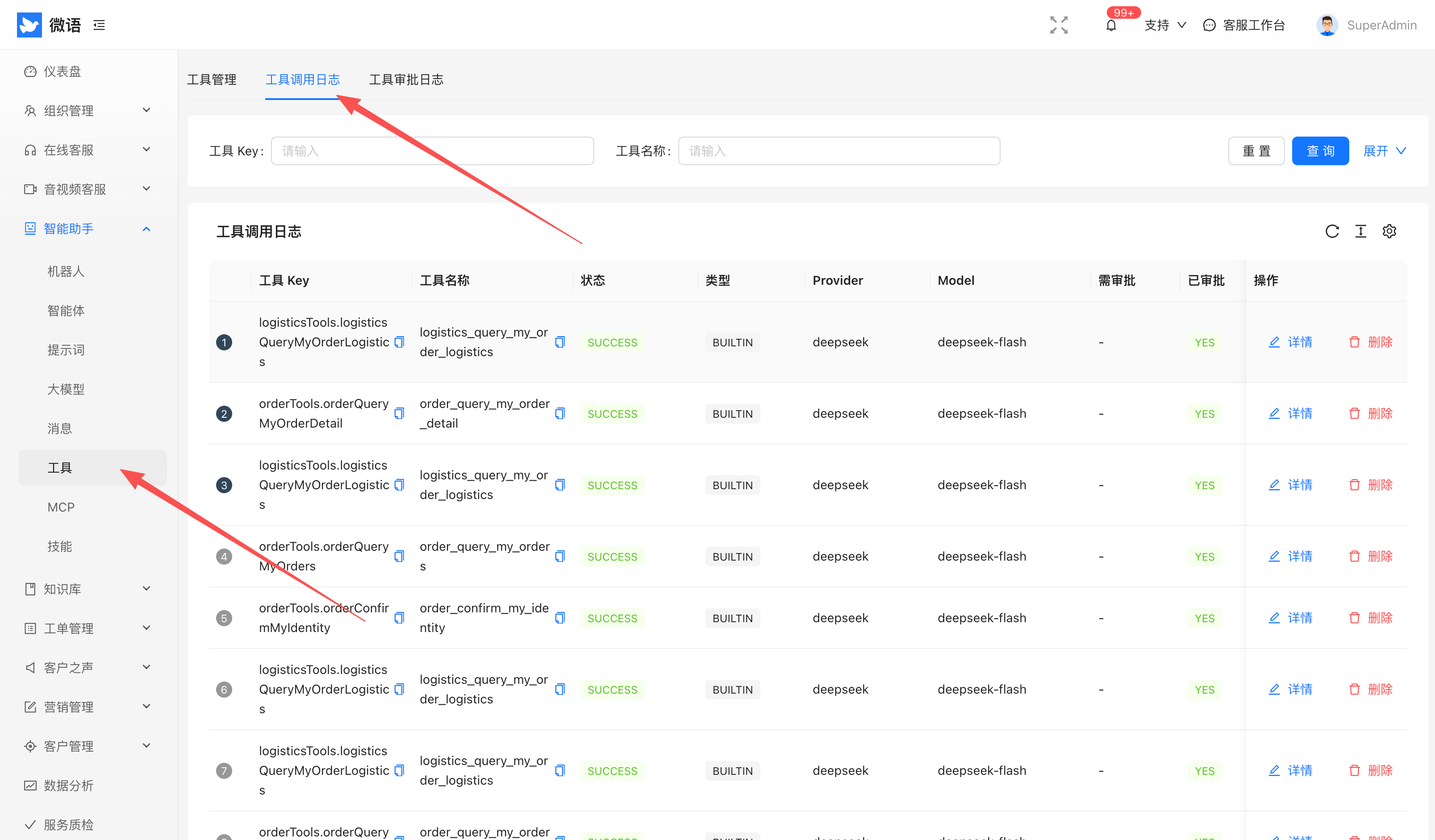
One known gap, stated plainly: the audit record for
order_confirm_my_identitystores raw tool arguments and therefore contains the plaintext mobile number/email. Logs only carry threadUid/visitorUid. Audit payload masking is still to be done.
Current boundaries
- Identity is wired into 4 providers: Zhipuai / DeepSeek / OpenAI / Custom. On other providers the order tools uniformly return
AUTH_REQUIREDfor now. - Provider-native dispatch can bypass local tools: Zhipuai / DashScope may use native dispatch when they detect a tool intent, which does not go through the local order tools. When debugging, set tool choice to AUTO and check whether the log shows native dispatch or a Spring AI callback.
- Order cards skip AI: the toolbar's "select order" sends an ORDER message that is explicitly skipped, complementing conversational lookup.
- Order status is not live logistics: "where is it?" is answered from logistics records; with no record the bot says there is no logistics information yet and never invents a trail.
- Read-only: this round does not include order create/update/delete, refunds, order cards, or a tool trajectory UI.
Order lookup is just one landing spot for tool calling. The same mechanism extends to logistics, after-sales, tickets, membership benefits and more: verify identity, narrow the scope, return allowlisted fields, and audit every call. For a service team, the value of "the bot can look up orders" is not how clever the model is, but that it looks up the right data, as little as possible, and traceably.