Bytedesk Now Supports Visitor Tag Routing: Route VIP Customers Straight to Their Dedicated Agents

A VIP member paying tens of thousands a year clicks the support entry, and the system randomly assigns the conversation to a brand-new agent — the customer has to explain their whole background from scratch, and the service experience suffers. In other teams, after-sales questions keep landing, via round-robin, on colleagues who know nothing about spare-parts processes, and the back-and-forth transfers waste everyone's time.
The common root cause: group round-robin only respects queue order, not who the customer is. Bytedesk now ships visitor tag routing: carry route tags on the chat URL, and the first human assignment prefers the agent bound to the tag. If that agent is unavailable, the conversation falls back to the existing routing mode automatically — a zero-risk, incremental rollout.
Where it fits
- Dedicated agents for VIP customers: hand high-value customers a dedicated link carrying a
viptag so their conversations go straight to a senior account manager; when the manager is offline, the fallback chain moves to backup agents or normal round-robin — a VIP never goes dark because one person is on leave. - After-sales direct line: the after-sales entry URL always carries the after-sales tag, so issues land directly with agents who know returns and spare parts, cutting cross-group transfers.
- Channel and campaign splitting: different campaigns and channels use differently tagged links, each routed to the sales or consultant who owns it — leads never mix.
- Multi-tag fallback chain: one URL can carry up to 10 ordered tags tried in sequence, effectively predefining a full "dedicated agent → backup agent → normal assignment" path for every customer.
How it works
Tag routing only takes effect at human assignment: the robot phase ignores tags. At the first human assignment (initial human reception, the robot's transfer-to-agent button, or a transfer keyword), the system tries each tag in snapshot order; a hit assigns the conversation to the bound agent, and a full miss falls back to the workgroup's existing routingMode (ROUND_ROBIN, LEAST_ACTIVE, …) exactly as before.
Visitor opens the chat URL with tags=uid-1,uid-2
  → the new thread stores an ordered tag snapshot
  → robot phase: tags are NOT used
  → first human assignment:
      tag routing enabled on the workgroup settings template?
        ├─ no  → original routingMode
        └─ yes → for each tag UID in snapshot order:
              valid ROUTE tag (same org, not deleted) with a binding?
              bound agent is a member of the serving workgroup, online, and has capacity?
                ├─ yes → assign to that agent through the existing accept/queue flow
                └─ no  → try the next tag
          all tags missed → original routingMode (queue / fallback / leave message)
Key design decisions:
- Ordering matters: tags are tried in URL order; the first available bound agent wins.
- Membership is validated against the actual serving workgroup, never trusted from configuration; an offline, at-capacity, or removed bound agent just means "try the next tag".
MANUALrouting mode always stays manual — tags never auto-assign in MANUAL mode.- The snapshot is frozen when the thread is created: refreshing or editing the URL never reroutes an existing conversation.
- The switch is off by default; visitors without route tags notice no change.
Three-step configuration
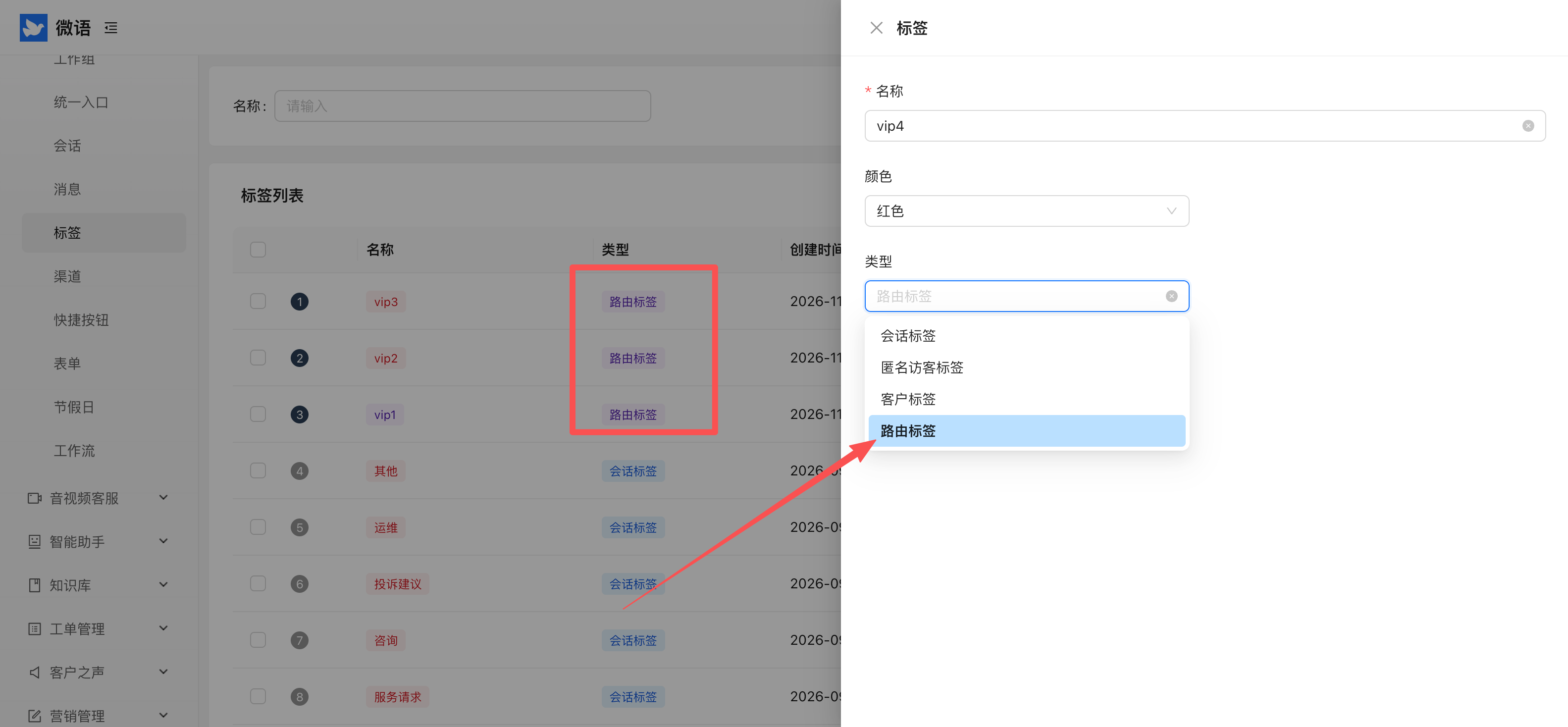
Step 1 — Create a route tag
In the admin console, open Customer Service → Tag (客服 → 标签) and create a tag of type Route Tag (路由标签). Only ROUTE-type tags participate in routing; thread/visitor/customer tags are ignored. Routing uses the tag UID, not the display name, so renaming a tag never breaks links you have already distributed.
Step 2 — Enable the switch and bind tags to agents
Bindings live on the shared workgroup settings template (route tag UID → agent UID). Two equivalent entry points:
- Workgroup settings → Route tab (enterprise/platform editions): select a settings template, enable the Enable visitor tag routing (启用访客标签路由) switch, add rows under Route tag bindings (路由标签绑定), and save.
- Workgroup Routing page (community edition): select a workgroup, toggle the switch, and maintain the same binding table; changes save immediately to the settings template referenced by that workgroup.
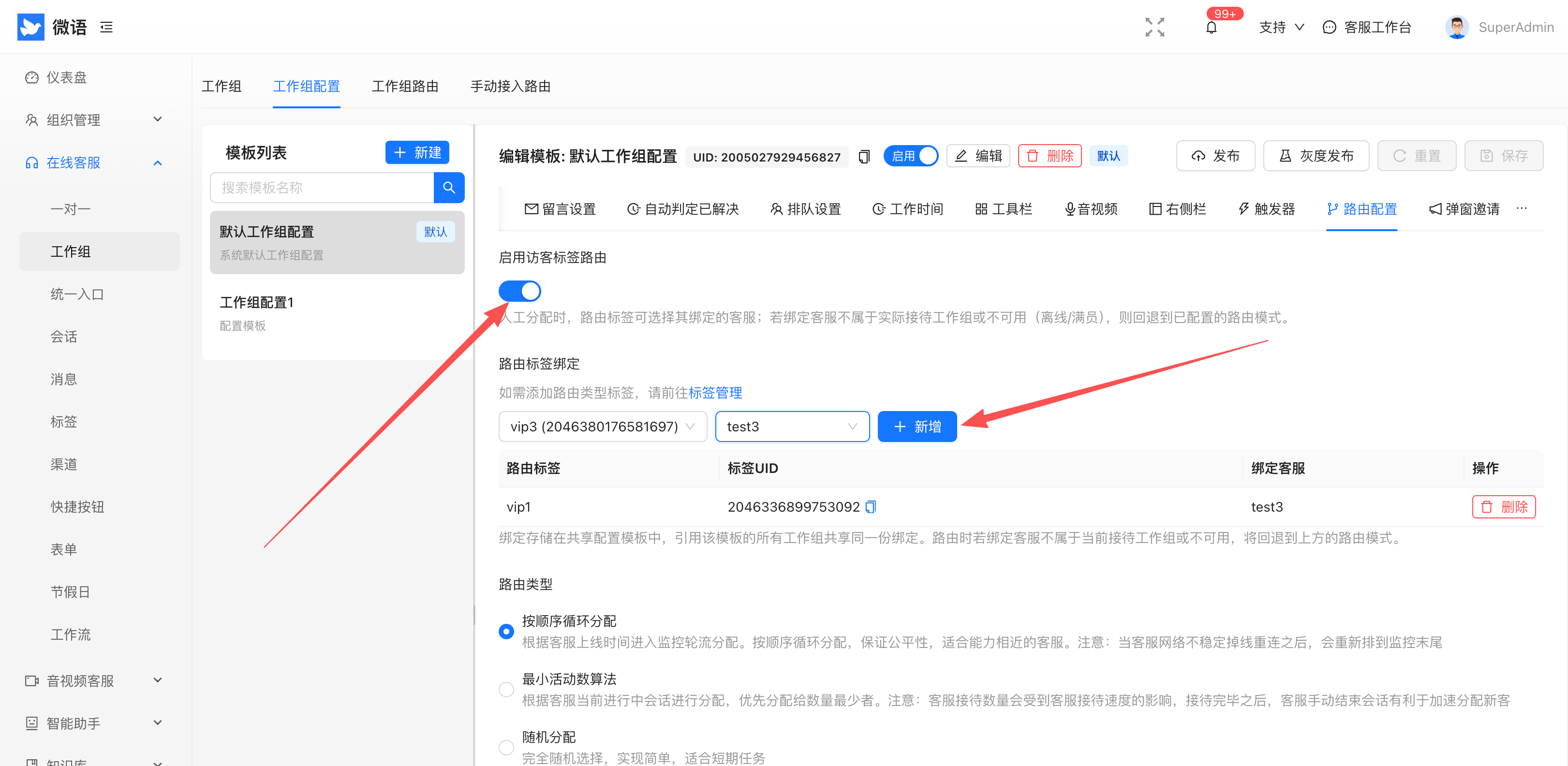
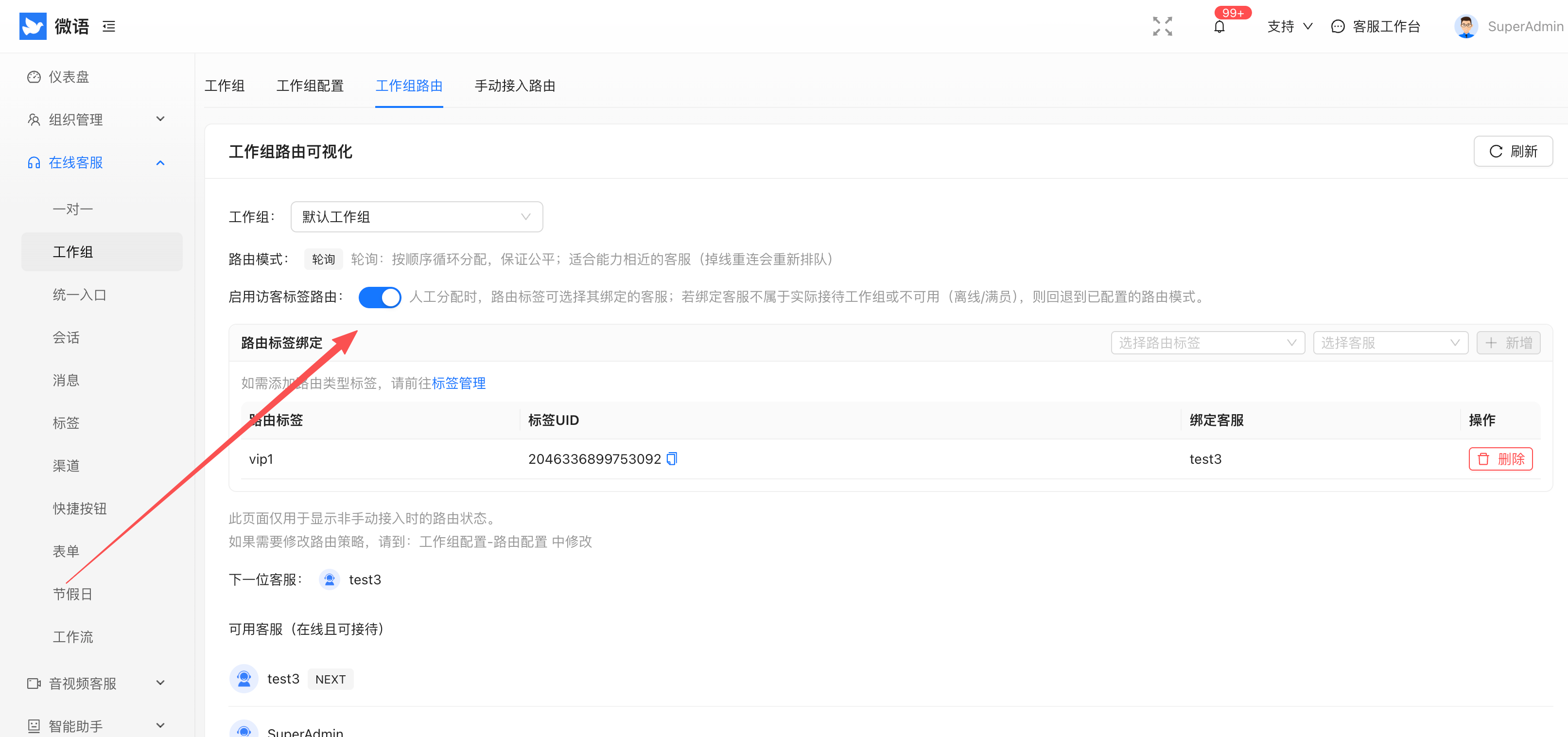
A given route tag always points to the same agent; bind several tags to different agents and put them in one URL to form a fallback chain.
Step 3 — Append tags to the visitor chat URL
Add a tags parameter with comma-separated route tag UIDs to your existing chat link:
https://chat.example.com/chat?org=df_org_uid&t=1&sid=df_wg_uid&tags=1165809330159873,1165809330259874
Place the tagged link in your member center, after-sales page, or campaign landing page. The visitor web app validates the parameter; it is a routing hint only and is never written to the visitor profile or /visitor/api/v1/init.
What happens at runtime
Taking the URL above, with the two tags bound to agents Wang and Li respectively:
| Runtime state | Result |
|---|---|
| Wang online with capacity | Assigned to Wang on first human assignment |
| Wang offline or at capacity, Li available | Falls to the second tag; assigned to Li |
| Both unavailable | All tags missed → original routing mode |
routingMode = MANUAL | Tags skipped entirely; manual accept as usual |
Common mistakes
| URL | Result |
|---|---|
tags=VIP会员 | Initialization error — UIDs allow A-Za-z0-9_- only; the display name is rejected outright |
tags=9999999999999999 | Well-formed but unknown UID → a normal miss; falls back to the original routing |
tags=uid1&tags=uid2 | Initialization error — the tags parameter may appear only once |
tags=uid1,uid1 | Duplicate UID deduplicated; behaves as a single tag |
Scope and limitations
- Workgroup text conversations only; calls and WebRTC are out of scope, and other SDKs and channels must preserve the
tagsparameter themselves. - Bindings are shared per settings template: a route tag points to the same agent in every workgroup referencing that template.
- No re-evaluation after the first human decision; a queued conversation never waits for the bound agent to come online.
- Off-hours, queue overflow, and leave-message behavior follow existing semantics; tags never bypass these rules.
Wrapping up
Tag routing brings "who the customer is" into the assignment decision: VIPs go straight to their dedicated agents, dedicated lines go to specialist agents, the fallback chain keeps availability up, and a full miss returns to the original routing mode. For existing deployments it is a zero-risk enhancement — leave the switch off and nothing changes.
Developers can read the Tag Routing guide for the complete visitor URL contract, thread request, and admin APIs.