Bytedesk Community Edition Adds In-Chat Fraud Warnings: Verify Before Any Transfer or Payment

Impersonation scams are getting disturbingly convincing: the "agent" on the other side knows your order number, your shipping address, even your most recent purchase — then, citing a "refund claim", a "deposit to unfreeze your account", or an "account verification check", they walk you toward transferring money to a so-called safe account. For an ordinary user, the hard part is not decoding the script; it is realizing, inside an innocuous chat window, that "this step involves money".
Bytedesk's Community Edition now adds an in-chat fraud warning: when the visitor types, or receives from the agent, a message that mentions money, transfers, or payments, the chat window shows a "Beware of scams" dialog reminding the user to verify the identity and payment details through official channels. The warning only informs — it never blocks: messages continue to send and receive, the conversation stays intact, and the user remains in full control of what happens next.
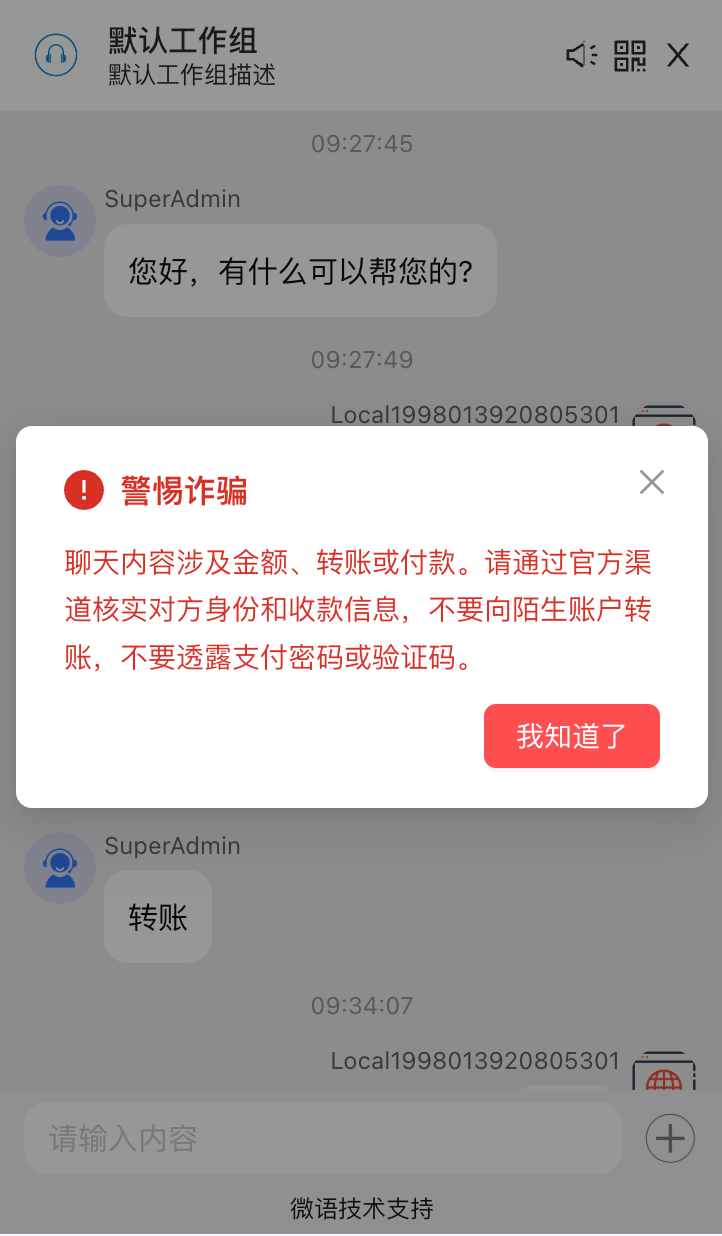
What the Feature Covers
The warning works in both directions of the visitor chat window:
- What the visitor is typing: when the draft contains payment-related wording (for example, "Please transfer to this account" or "I paid ¥88.50"), a warning appears after about 0.6 seconds of typing pause; pasting and immediately sending is also covered.
- Live messages from human agents: when an agent message contains phrases like "please pay the deposit" or "add me on WeChat and transfer privately", a warning appears; quoted replies are checked only for the newly written text, never the quoted original.
At the same time, the feature stays deliberately restrained so normal consultations are not disturbed:
- It does not scan chat history, post-reconnect backfill, or bot and system messages.
- It does not inspect order cards, images, voice messages, or other rich media — no OCR, no speech recognition.
- It records and reports nothing: no hit logs, no chat content; all matching happens locally in the browser.
- Sending and receiving share one 5-minute cooldown per conversation, so warnings never pop in a chain; switching conversations or refreshing the page resets the count.
Keywords and Amount Recognition
The built-in dictionary extends "money, amount, transfer, payment" with common payment phrasing, and maintains both Simplified and Traditional Chinese variants:
| Category | Examples |
|---|---|
| Money and amounts | 钱/錢, 金额/金額, 款项/款項, 钱款/錢款, 人民币/人民幣, 现金/現金 |
| Payment actions | 转账/轉賬, 汇款/匯款, 打款, 付款, 支付, 缴费/繳費, 扣款, 收款, 代付, 退款, 提现/提現, 充值, 扫码付/掃碼付, 收款码/收款碼, 付款码/付款碼 |
| Payment channels | 银行卡/銀行卡, 银行账户/銀行帳戶, 收款账户/收款帳戶, 支付宝/支付寶, 微信支付, 对公账户/對公帳戶, 私人账户/私人帳戶 |
| Fees and scam scripts | 押金, 定金, 保证金/保證金, 手续费/手續費, 解冻费/解凍費, 认证费/認證費, 垫付/墊付, 刷单/刷單, 返现/返現, 返利, 私下转账/私下轉帳, 线下付款/線下付款, 解除冻结/解除凍結 |
Beyond keywords, the matcher recognizes amounts tied to currency units, such as ¥88.50, ¥ 300, 100 元, and 1,000块钱, including full-width digits and currency symbols. To avoid false positives, bare numbers, phone numbers, order numbers, and standalone words like 元, 块, "verification code", or "link" do not trigger a warning.
Keeping the single character 钱 (money) means an ordinary question like "how much does this cost?" may also pop the warning. This is a deliberate trade-off: in fraud prevention, the cost of one extra reminder is far lower than the cost of missing a real scam. If it ever becomes noisy, we can tune the dictionary granularity or the cooldown in a future release.
The Warning Copy
The dialog text itself is part of the anti-fraud education:
Beware of scams This chat mentions money, transfers, or payments. Verify the person's identity and payment details through official channels. Never transfer money to unknown accounts or share payment passwords or verification codes.
The copy ships in every language the Visitor supports — Simplified and Traditional Chinese, English, Japanese, Korean, Vietnamese, Malay, Spanish, French, and Thai — so visitors understand the warning regardless of the chat window's language.
Why Community Edition Only?
The feature targets Bytedesk's Community Edition (free deployments, plus deployments degraded to community mode under the existing license rules). Two reasons:
- Community deployments are the most distributed and least protected. Teams self-hosting the community edition rarely have dedicated security operations, making the visitor chat the best place for a default safeguard.
- Commercial teams usually have bespoke compliance needs. Enterprise and Platform edition customers can build finer-grained controls around their own risk policies instead of accepting one hard-coded dictionary.
Edition detection happens in the browser and only activates after the current server configuration has been confirmed as loaded — a cold start with missing cache or an unconfirmed configuration never fires a false warning and never affects chat availability.
Implementation Notes
For developers who care about the details:
- Pure front end, zero reporting: the dictionary lives in the front-end code, matching runs locally in the browser, and no backend API, log, or analytics event is added.
- Precise trigger scope: input checks hook into the visitor composer's typing and sending paths; incoming checks process only live text messages from human agents in the current conversation, reusing the existing message model's sender-role and conversation-ownership checks. Bot, system, and historical messages are never scanned.
- IME friendly: matching pauses during Chinese IME composition and restarts the debounce afterward, so typing "zhuanzhang" in pinyin does not trigger mid-composition warnings.
- Non-invasive to the message pipeline: the incoming check runs on a path separate from message ingestion and receipts, deduplicates redeliveries by message UID, and any failure in the warning layer leaves messaging untouched.
- Dialog exclusivity: while login, pre-chat form, or license dialogs are open, the fraud warning neither stacks on top nor plays catch-up afterward.
Final Thoughts
Anti-fraud is an ongoing arms race: scripts and channels keep changing, but one rule never does — "before any transfer, verify". Bytedesk now builds that rule into the chat window itself. It cannot make decisions for the user, but at the critical moment it hands the decision back to them.
Community Edition users get the feature by upgrading the Visitor front end — no configuration required. If you hit a false positive, a miss, or have dictionary suggestions, please open an issue.