Unread Message Count Integration
This page introduces how to integrate the unread message count functionality of the Weiyu customer service system into your application, displaying the number of unread customer service messages for users in real-time, helping to improve user experience and message read rates.
- Demo link: Unread Message Count Integration Demo
- Demo code:
- Unread Message Count Integration Example - React
- Unread Message Count Integration Example - Vue
Note: Please ensure you have completed the basic functionality integration in the React Integration Guide or Vue Integration Guide before proceeding with unread message count integration.
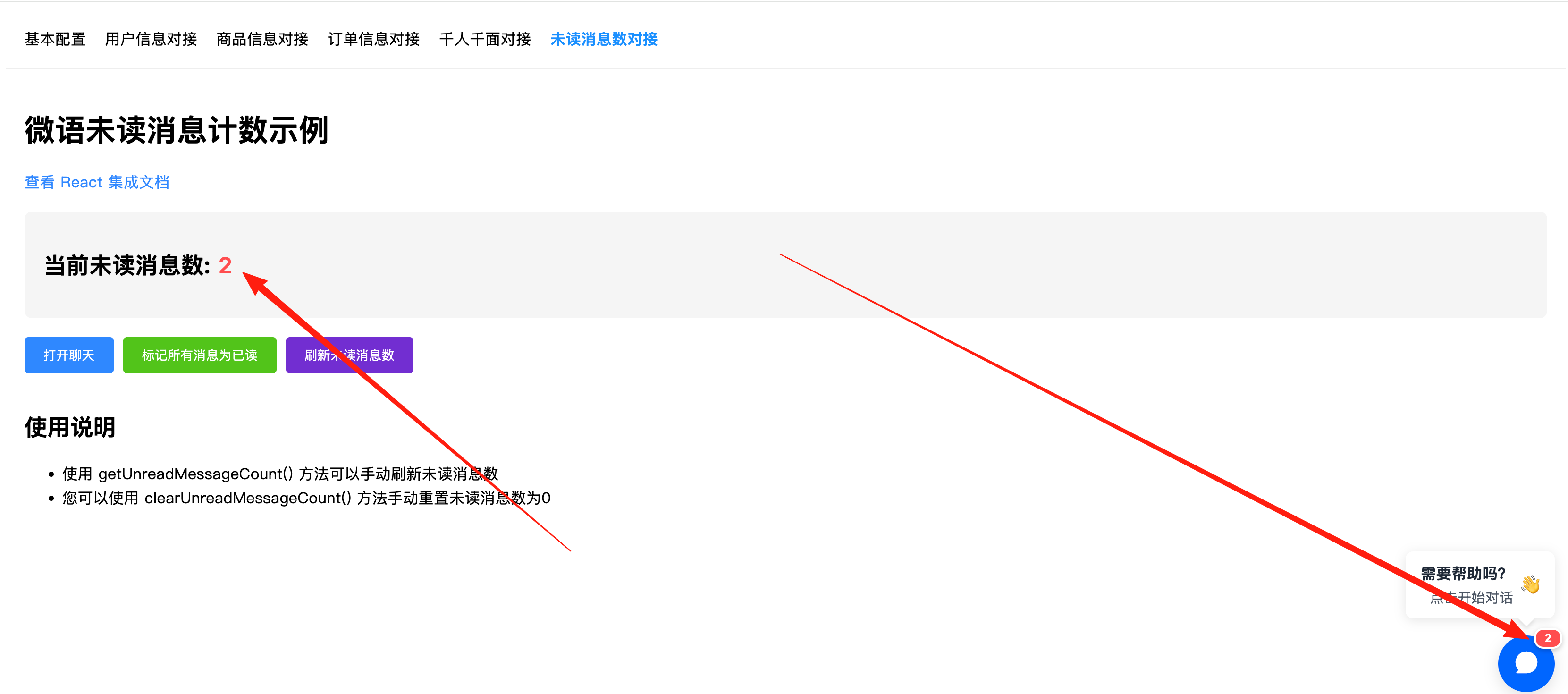
Why is Unread Message Count Integration Needed?
In modern applications, displaying unread message counts in real-time is an important feature for improving user experience. It can:
- Remind users of new customer service messages that need to be viewed
- Increase the likelihood of users replying to messages, improving communication efficiency
- Reduce the chance of users missing important messages
- Enhance the professionalism and completeness of the application
- Provide users with better message management experience
Unread Message Count Functionality Implementation
The Weiyu customer service system provides simple and easy-to-use APIs to obtain and manage unread message counts, mainly including three core methods:
getUnreadMessageCount(): Get current unread message countclearUnreadMessages(): Mark all messages as read
Basic Usage
1. Get Unread Message Count
You can use the getUnreadMessageCount() method to get the current user's unread message count at any time:
// Get unread message count
window.bytedesk?.getUnreadMessageCount().then((count) => {
  console.log('Current unread message count:', count);
  // Update your UI display
  setUnreadCount(count);
});
2. Mark All Messages as Read
When users have viewed all messages, or when you need to manually reset the unread message count, you can use the clearUnreadMessages() method:
// Mark all messages as read
window.bytedesk?.clearUnreadMessages().then((count) => {
  console.log('All messages marked as read:', count);
  // Update UI display
  // setUnreadCount(0);
});
API Reference
1. getUnreadMessageCount()
Get the total number of unread messages for the current user.
Return value: Promise<number> - Unread message count
Example:
window.bytedesk?.getUnreadMessageCount().then((count) => {
  console.log('Current unread message count:', count);
});
2. clearUnreadMessages()
Mark all messages as read, reset unread count to 0.
Return value: Promise<number> - Unread message count after reset (should be 0)
Example:
window.bytedesk?.clearUnreadMessages().then((count) => {
  console.log('All messages marked as read, current unread count:', count);
});
Best Practices
1. Unread Message Count Display
- Appropriate Position: Display unread count in navigation bar, tabs, or fixed position
- Eye-catching Style: Use red or other eye-catching colors to display unread count
- Number Limit: When unread count exceeds a certain number (e.g., 99), display as "99+"
- Auto Refresh: Regularly auto-refresh unread count (recommended interval not less than 30 seconds)
2. User Experience Optimization
- Instant Update: When users open chat window and read messages, update unread count promptly
- Notification Reminders: Combine with browser notification API to send new message notifications when users allow
- Sound Alerts: Add sound alerts for important messages (consider user preference settings)
- Custom Control: Allow users to control whether to display unread count and notification methods
3. Performance Considerations
- Avoid Frequent Queries: Don't call API too frequently to check unread message count
- Caching Strategy: Cache unread count appropriately to reduce request frequency
- Error Handling: Handle API request failures properly to avoid affecting user experience
Common Questions
Q1: Unread message count doesn't update automatically, how to solve?
A: Currently, unread message count needs to be obtained manually by calling API. You can:
- Get unread message count once when application initializes
- Set timer to refresh regularly (e.g., every 1-5 minutes)
- Get once each when users open chat window and before closing chat window
Q2: How to synchronize unread message status between multiple tabs?
A: For multi-tab scenarios, you can:
- Use LocalStorage event mechanism for communication between tabs
- Each tab independently gets latest unread message count regularly
- When one tab calls
clearUnreadMessages()method, notify other tabs to update status through LocalStorage
Example code:
// Broadcast to other tabs after marking as read
window.bytedesk?.clearUnreadMessages().then(() => {
  localStorage.setItem('bytedesk_unread_update', Date.now().toString());
});

// Listen for changes in other tabs
window.addEventListener('storage', (e) => {
  if (e.key === 'bytedesk_unread_update') {
    window.bytedesk?.getUnreadMessageCount().then((count) => {
      setUnreadCount(count);
    });
  }
});
Q3: Can I get unread message count for specific sessions?
A: Current version API mainly provides total unread message count. For more granular control, it's recommended:
- Use
getUnreadMessageCount()to get total unread count - Record user's reading status for specific sessions in your application
Q4: What to do if unread message count display is abnormal?
A: If you encounter abnormal unread message count display, try the following solutions:
- Confirm your application connects normally with Weiyu customer service system
- Check if user login status is consistent
- Manually call
getUnreadMessageCount()to refresh count - If necessary, call
clearUnreadMessages()to reset count
Q5: How to use pure API to get visitor's unread message count?
- First get current visitor uid, you can get visitor information from localStorage.getItem('VISITOR_STORE'), parse currentVisitor from json and get uid
// Get visitor information
const visitorInfo = localStorage.getItem('VISITOR_STORE');
const currentVisitor = JSON.parse(visitorInfo).state.currentVisitor;
const uid = currentVisitor.uid; // Get visitor uid
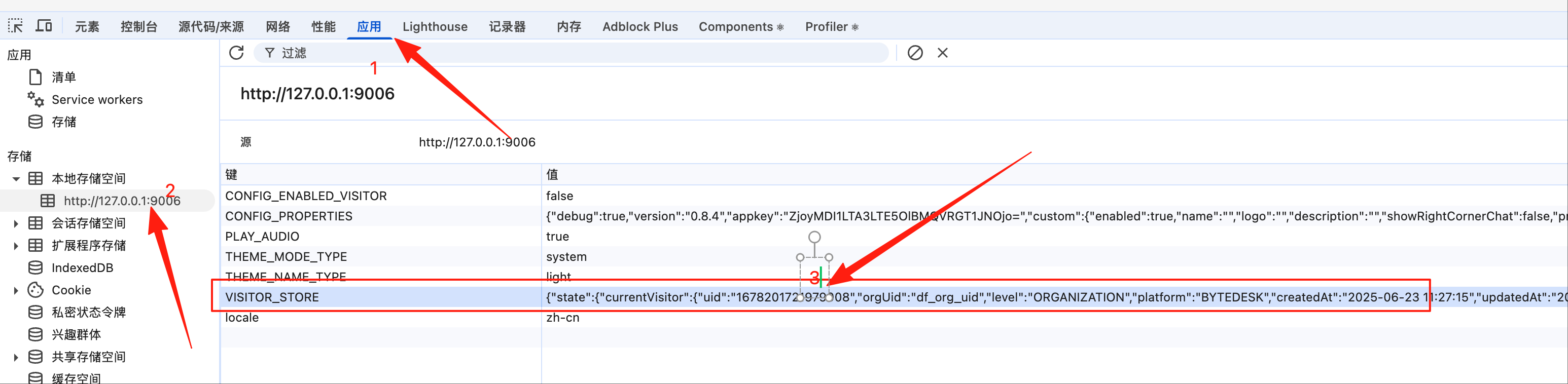
- Call API to get unread message count. Code example:
// Request URL example: Please replace 127.0.0.1:9003 with your Weiyu customer service system address
http://127.0.0.1:9003/visitor/api/v1/message/unread/count?uid=1678201721979008
// Return result example:
{
    message: "get unread messages count success",
    code: 200,
    data: 10 // Unread message count
}
Q6: How to pull unread message list from Weiyu customer service system visitor end?
- Call API to get unread messages. Code example:
// Request URL example: Please replace 127.0.0.1:9003 with your Weiyu customer service system address
http://127.0.0.1:9003/visitor/api/v1/message/unread?pageNumber=0&pageSize=10&uid=1678201721979008
// Return result example:
{
    message: "get unread messages success",
    code: 200,
    data: [] // Unread message list
}
- Reference API Interface Code
- Note: Visitor end anonymous users, no token required, only uid needed. For logged-in user authorization, please contact Weiyu customer service.
Summary
Unread message count integration is an important feature for improving user experience. By displaying unread message count in real-time, it can effectively remind users to view customer service messages promptly, improving communication efficiency. The Weiyu customer service system provides simple and easy-to-use APIs to help developers easily implement unread message count management functionality. By following the best practices provided in this document, you can create a more complete message notification experience for users.